From Visitors to Buyers: E-commerce Conversion Tips That Actually Work
In today’s competitive digital marketplace, attracting visitors to your e-commerce website is only the first step toward building a successful online business. The real challenge is converting those visitors into paying customers. Many online stores receive traffic through search engines, social media, paid advertisements, and email marketing, yet struggle to turn that traffic into sales. This often happens because visitors encounter confusing navigation, slow-loading pages, unexpected costs, complicated checkout processes, or a lack of trust.
E-commerce conversion optimization focuses on improving the shopping experience so that more visitors take meaningful actions, such as adding products to their carts, completing purchases, or signing up for special offers. Even small improvements to your website can help reduce friction, build customer confidence, and increase sales opportunities.
Whether you operate a small online store or manage a large e-commerce platform, understanding customer behavior and applying practical conversion strategies can help you achieve better results. In this blog, we will explore effective e-commerce conversion tips that can help turn casual visitors into loyal buyers.
1. Understand Your Target Audience
Before optimizing your online store, it is important to understand who your customers are, what they need, and why they choose to buy particular products. A website designed around customer expectations is more likely to encourage purchases.
Start by analyzing your audience’s interests, demographics, browsing behavior, purchasing patterns, and common challenges. Use website analytics, customer surveys, product reviews, and feedback forms to understand what motivates people to buy.
For example, customers shopping for electronic products may prioritize technical specifications, warranties, and product comparisons. Customers purchasing clothing may focus more on size guides, product images, fabric details, and return policies.
Practical tips:
- Identify your most valuable customer segments.
- Analyze which products attract the most views and sales.
- Understand where visitors abandon the purchasing journey.
- Collect feedback to discover common shopping frustrations.
- Personalize product recommendations based on relevant customer preferences.
When you understand your audience, you can create a shopping experience that addresses their needs and makes purchasing decisions easier.
2. Improve Website Speed and Performance
Website speed plays an important role in the online shopping experience. Visitors expect product pages, images, menus, and checkout screens to load quickly. A slow website can interrupt the buying journey and encourage potential customers to leave before exploring your products.
Performance is especially important for mobile shoppers, who may browse using different devices and internet connections.
To improve your website performance, optimize images, reduce unnecessary scripts, use browser caching, and consider a reliable hosting provider or content delivery network. Regularly test your website on desktop and mobile devices to identify performance issues.
Website speed optimization tips:
- Compress product images without significantly reducing quality.
- Use modern image formats where appropriate.
- Minimize unnecessary JavaScript and CSS.
- Reduce redirects and avoid excessive third-party scripts.
- Monitor Core Web Vitals and other performance indicators.
- Test important pages, including product pages and checkout screens.
A fast, responsive website helps customers explore products more comfortably and complete their purchases with fewer interruptions.
3. Create High-Quality Product Pages
Product pages are among the most important elements of an e-commerce website because they help customers decide whether a product meets their expectations.
A product page should answer essential questions quickly. Customers want to understand what the product does, what makes it valuable, how much it costs, and whether it is suitable for their needs.
Use clear product titles, informative descriptions, high-quality images, accurate specifications, and visible pricing. Where relevant, include product dimensions, materials, compatibility information, usage instructions, and warranty details.
Elements of a high-converting product page:
- Clear and descriptive product titles.
- High-resolution images from multiple angles.
- Product videos or demonstrations where useful.
- Easy-to-understand descriptions highlighting benefits.
- Transparent pricing and delivery information.
- Genuine customer reviews and ratings.
- Clear availability and stock information.
- A prominent “Add to Cart” or “Buy Now” button.
Instead of simply listing product features, explain how those features solve customer problems. For example, rather than describing a laptop as having a long-lasting battery, explain how its battery life can support work, study, or travel throughout the day.
The more confidently customers understand a product, the easier it becomes for them to make an informed buying decision.
4. Make Website Navigation Simple and Intuitive
Customers should be able to find what they need without unnecessary effort. If your website has confusing menus, poorly organized categories, or too many navigation steps, visitors may struggle to locate the right products.
Organize your store into logical categories and subcategories. Use familiar menu labels, a visible search bar, and helpful filters to improve product discovery.
For stores with large inventories, filters such as price, brand, size, color, rating, availability, and product type can significantly simplify the shopping process.
Navigation best practices:
- Keep the main menu simple and easy to understand.
- Organize products into relevant categories.
- Add breadcrumb navigation to help users understand their location.
- Provide search suggestions and useful search results.
- Allow customers to sort and filter products.
- Make important pages, such as Contact Us, Shipping, Returns, and FAQs, easy to find.
A well-organized website reduces the effort required to discover products and helps visitors move naturally from browsing to purchasing.
5. Optimize Your Website for Mobile Shopping
Mobile commerce continues to play a major role in online shopping. Many customers discover products through social media, advertisements, search engines, and messaging apps on their smartphones.
If your website is difficult to use on a mobile device, you may lose potential customers even when your products and prices are competitive.
A mobile-friendly e-commerce website should display content clearly, load efficiently, and make important actions easy to complete on smaller screens.
Mobile conversion optimization tips:
- Use responsive website layouts.
- Make buttons large enough to tap comfortably.
- Keep forms short and simple.
- Ensure product images fit different screen sizes.
- Make prices, delivery information, and purchase buttons easy to locate.
- Support convenient payment methods available to your customers.
- Minimize intrusive pop-ups that block product information.
Test the entire shopping journey on different mobile devices, from the homepage to the final payment confirmation. Do not assume that a website that looks good on a desktop will automatically provide a smooth mobile experience.
6. Build Trust with Your Customers
Trust is essential in e-commerce because customers often purchase products without physically seeing or testing them before delivery. Visitors need confidence that your business is legitimate, payments are handled securely, and products will arrive as promised.
A professional website design helps, but trust also depends on transparency, accurate information, and reliable customer support.
Display clear contact information, shipping policies, return conditions, refund procedures, and privacy information. Use secure payment processing and provide honest product descriptions.
Ways to build customer trust:
- Display genuine product reviews and ratings.
- Publish clear shipping and return policies.
- Provide accessible customer support details.
- Use HTTPS and trusted payment providers.
- Show accurate product availability and delivery estimates.
- Display business information where appropriate.
- Avoid fake reviews, misleading claims, and artificial urgency.
Customer testimonials and product reviews can help shoppers evaluate a product, particularly when they are comparing similar options. However, reviews should be authentic and presented transparently.
When customers feel confident about your business, they are more likely to proceed with a purchase and consider returning in the future.
7. Simplify the Checkout Process
Checkout is one of the most critical stages of the e-commerce conversion funnel. Customers may add products to their carts but abandon the purchase if checkout requires too many steps or asks for unnecessary information.
A complicated checkout experience can create frustration, especially for first-time buyers who are unfamiliar with your store.
Keep the checkout process as simple as possible. Allow guest checkout, request only essential details, and clearly explain each step of the process.
Checkout optimization tips:
- Offer guest checkout without forcing account creation.
- Reduce unnecessary form fields.
- Provide clear progress indicators when checkout has multiple steps.
- Display shipping charges, taxes, and the total price upfront.
- Offer appropriate and familiar payment methods.
- Show clear error messages when information is incorrect.
- Make order confirmation easy to understand.
- Ensure checkout works smoothly on mobile devices.
For customers in India, offering relevant payment options such as UPI, cards, net banking, and other supported methods can help make checkout more convenient.
The goal is to remove unnecessary obstacles between a customer's decision to buy and the successful completion of the order.
8. Reduce Cart Abandonment
Cart abandonment occurs when shoppers add products to their carts but leave without completing their purchases. It is a common challenge for online retailers and can happen for several reasons.
Some customers are comparing prices, researching products, or saving items for later. Others may abandon their carts because of unexpected delivery charges, limited payment options, technical problems, or a lengthy checkout process.
Understanding why customers abandon their carts helps you choose the right solutions.
Strategies to reduce cart abandonment:
- Show delivery fees and estimated arrival dates early.
- Make return and refund policies easy to access.
- Offer guest checkout.
- Provide multiple suitable payment methods.
- Resolve payment failures and checkout errors.
- Send permitted cart reminder emails or messages.
- Offer customer support when shoppers need assistance.
- Make saved carts available when customers return.
Abandoned-cart messages should be helpful, relevant, and respectful. A reminder that includes product details and a direct link to the cart can make it easier for interested shoppers to continue.
Discounts may encourage some customers to complete a purchase, but they should be used strategically rather than offered automatically to everyone who abandons a cart.
9. Use Clear and Compelling Calls to Action
A call to action (CTA) tells visitors what to do next. On an e-commerce website, common examples include “Add to Cart,” “Buy Now,” “Explore Products,” and “Get Started.”
Effective CTAs are clear, easy to locate, and consistent with the visitor’s current stage in the buying journey.
Use contrasting buttons, concise language, and sufficient spacing so that important actions stand out without overwhelming the page.
CTA optimization tips:
- Use action-oriented and easy-to-understand wording.
- Place primary purchase buttons near key product information.
- Ensure buttons are easy to tap on mobile devices.
- Avoid displaying too many competing actions.
- Use different CTAs for browsing, comparing, and purchasing.
- Test button wording and placement to identify what works best.
For example, “Add to Cart” may be appropriate for customers who want to continue shopping, while “Buy Now” may suit a direct purchase flow.
The best CTA depends on the product, customer expectations, and the purpose of the page.
10. Offer Transparent Pricing and Shipping Information
Unexpected costs can discourage customers from completing an order. If shoppers discover additional delivery fees, taxes, handling charges, or other costs only at the final checkout stage, they may feel misled.
Transparent pricing helps customers understand the full cost of their purchase before committing.
Display product prices clearly and explain shipping charges, applicable taxes, delivery timelines, and any relevant conditions. If free shipping is available above a minimum order value, communicate that requirement accurately.
Pricing and shipping best practices:
- Show applicable charges before the final checkout step.
- Explain free-shipping eligibility clearly.
- Provide realistic delivery estimates.
- Avoid hidden fees.
- Communicate return shipping costs where relevant.
- Keep promotional terms and conditions easy to understand.
Customers are more likely to trust an online store when pricing is predictable and the terms of purchase are easy to understand.
11. Personalize the Shopping Experience
Personalization helps make an online store more relevant to individual shoppers. Instead of presenting every visitor with the same products and promotions, businesses can use appropriate customer preferences and browsing signals to improve product discovery.
For example, an e-commerce store may recommend related products, display recently viewed items, or suggest accessories that complement a product in the cart.
Personalization should make shopping more convenient rather than intrusive.
Personalization strategies:
- Recommend products related to the item being viewed.
- Display recently viewed products.
- Suggest complementary products where relevant.
- Tailor product collections to stated preferences.
- Send relevant follow-up messages with appropriate consent.
- Use purchase history responsibly to improve recommendations.
A customer purchasing a camera, for instance, may appreciate recommendations for compatible memory cards, camera bags, or tripods.
Use personalization carefully, respect privacy preferences, and avoid collecting more information than necessary. Relevant recommendations can improve the shopping experience and help customers discover products they genuinely need.
12. Use Customer Reviews and Social Proof
Social proof helps customers understand how other people have experienced a product or service. Reviews, ratings, testimonials, and customer photographs can provide useful information that product descriptions alone may not communicate.
For first-time buyers, authentic customer feedback can help reduce uncertainty and support informed decisions.
Place relevant reviews close to product details, and allow customers to evaluate both positive and negative feedback.
How to use social proof effectively:
- Collect reviews from genuine customers.
- Display useful product ratings.
- Encourage detailed feedback after purchases.
- Include customer photos when appropriate and permitted.
- Respond professionally to negative reviews.
- Highlight verified reviews where verification is available.
- Avoid fabricated testimonials or misleading ratings.
Negative feedback can also reveal product issues, delivery problems, or service gaps that your business needs to address.
Social proof is most effective when it is genuine, relevant, and transparent.
13. Use Discounts and Offers Strategically
Promotions can motivate customers to purchase, but discounts should support a clear business objective. Excessive discounting may reduce profit margins, train customers to wait for sales, or make your products appear less valuable.
Instead of offering discounts to every visitor, consider using targeted promotions that encourage specific behaviors.
Examples of effective promotional strategies:
- First-order offers for new customers.
- Free shipping above a suitable order value.
- Seasonal promotions.
- Product bundles that provide genuine value.
- Loyalty rewards for repeat purchases.
- Limited-time offers with accurate deadlines.
- Discounts for selected products or customer segments.
Make the offer, eligibility requirements, and expiration date clear. Do not use false countdown timers or claim that stock is limited when it is not.
Measure the results of each promotion by looking beyond revenue. Consider profit margins, average order value, repeat purchases, and customer acquisition costs to understand whether an offer benefits the business.
14. Improve Product Search and Filtering
Customers who know what they want should be able to find it quickly. A weak search function can prevent visitors from discovering relevant products, particularly in stores with large catalogs.
An effective search experience should handle common spelling errors, offer relevant suggestions, and display useful results.
Search optimization tips:
- Place the search bar in a visible location.
- Support product names, categories, and relevant attributes.
- Provide autocomplete suggestions where appropriate.
- Display helpful results for partial search terms.
- Offer filters for price, brand, size, ratings, and availability.
- Show a helpful message when no matching products are found.
- Recommend relevant alternatives when appropriate.
Review your website’s internal search data to identify common customer requests and searches that return no results. These insights may reveal missing products, confusing product names, or opportunities to improve your catalog.
15. Use Email Marketing to Bring Customers Back
E-commerce conversion optimization does not end when visitors leave your website. Email marketing can help reconnect with shoppers, share useful product information, and encourage repeat purchases.
Build your email strategy around customer needs rather than sending the same promotional message to everyone.
Useful e-commerce email campaigns include:
- Welcome emails for new subscribers.
- Abandoned-cart reminders.
- Order confirmations and delivery updates.
- Relevant product recommendations.
- Back-in-stock notifications.
- Post-purchase support and feedback requests.
- Loyalty program updates.
- Re-engagement campaigns for inactive customers.
Personalize messages where appropriate and ensure that promotional emails follow applicable consent and privacy requirements.
Track metrics such as click-through rate, conversion rate, revenue per email, unsubscribe rate, and repeat purchases. These measurements can help you identify which campaigns provide meaningful value.
16. Use Analytics to Identify Conversion Problems
Successful e-commerce optimization requires more than assumptions. Analytics helps you understand how customers interact with your website and identify where the buying journey breaks down.
Start by establishing a baseline for your website's performance. Monitor the number of visitors, product views, add-to-cart events, checkout starts, completed purchases, and revenue.
A useful set of metrics includes:
- Conversion rate: The percentage of visits or users that complete a defined purchase action, depending on your measurement method.
- Add-to-cart rate: The proportion of visitors or product viewers who add items to their carts.
- Cart abandonment rate: The proportion of shopping carts that do not result in completed purchases, based on your chosen measurement method.
- Average order value (AOV): The average revenue generated per order.
- Checkout completion rate: The proportion of checkout starters who successfully complete a purchase.
- Customer acquisition cost (CAC): The cost of acquiring a customer.
- Repeat purchase rate: The proportion of customers who make additional purchases during a defined period.
Use tools such as Google Analytics 4, heatmaps, session recordings, and your e-commerce platform's reporting features to investigate customer behavior. Make sure tracking is configured correctly and that data collection complies with applicable privacy requirements.
For example, if many visitors view a product but very few add it to their carts, investigate product pricing, descriptions, images, reviews, and availability. If customers add products to their carts but leave during checkout, examine shipping costs, payment options, and technical errors.
Analytics helps you focus on the problems most likely to affect sales.
17. Run A/B Tests to Improve Results
A/B testing compares two versions of a webpage or element to determine which performs better for a defined objective.
Rather than changing multiple website elements at once, test specific changes and measure their impact.
Potential experiments include:
- Testing alternative CTA wording.
- Comparing product image layouts.
- Evaluating shorter checkout forms.
- Testing different product description formats.
- Comparing shipping information placements.
- Testing relevant product recommendation layouts.
Before running a test, define the hypothesis, primary success metric, and test audience. Ensure that the experiment runs long enough to gather sufficient data and account for differences in traffic and customer behavior.
For example, you might hypothesize that displaying delivery estimates on product pages will increase add-to-cart rates by reducing uncertainty.
Compare the results with the original experience and check whether the change produces a meaningful improvement. Avoid choosing a winner based on a small or unreliable sample.
Continuous experimentation allows e-commerce businesses to improve their websites using evidence rather than guesswork.
18. Provide Excellent Customer Support
Customer questions can become barriers to purchase when shoppers cannot find reliable answers. Uncertainty about product compatibility, delivery, payment, warranties, or returns may cause visitors to postpone or abandon their decisions.
Accessible customer support helps address these concerns and creates a better shopping experience.
Customer support improvements:
- Provide a clear FAQ section.
- Display contact details and support hours.
- Offer email, phone, chat, or messaging support where practical.
- Create informative product guides.
- Respond promptly to customer queries.
- Explain returns, refunds, and warranties clearly.
- Keep order tracking information accessible.
Live chat or chatbots may help answer common questions, but customers should have a clear way to reach a human representative when necessary.
Good customer support can improve purchase confidence, resolve problems, and encourage repeat business.
19. Focus on Customer Retention After the First Purchase
Converting a visitor into a buyer is an important milestone, but long-term e-commerce success also depends on encouraging customers to return.
Acquiring new customers can be expensive, so providing a positive post-purchase experience can help businesses build stronger customer relationships.
Start with accurate order confirmations, timely shipping updates, reliable delivery, and accessible support. Follow up with helpful product guidance or requests for genuine feedback where appropriate.
Customer retention strategies:
- Deliver products as promised.
- Make returns and refunds straightforward.
- Provide responsive after-sales support.
- Offer relevant loyalty rewards.
- Send useful product care instructions.
- Recommend complementary products when appropriate.
- Use customer feedback to improve products and service.
Avoid sending excessive promotional messages or making it difficult for customers to unsubscribe. Sustainable retention comes from delivering genuine value and maintaining trust.
20. Build an E-commerce Conversion Optimization Checklist
Improving conversions can feel overwhelming when there are many areas to address. A simple checklist helps you prioritize practical improvements and track progress over time.
Website experience
- Ensure pages load quickly.
- Test the website on desktop and mobile.
- Simplify navigation and product discovery.
- Improve product images and descriptions.
- Make primary calls to action easy to find.
Trust and transparency
- Display genuine customer reviews.
- Provide clear shipping and return policies.
- Explain total costs before payment.
- Use secure and reliable payment processing.
- Make customer support easy to access.
Checkout and payments
- Offer guest checkout.
- Reduce unnecessary form fields.
- Support relevant payment methods.
- Fix checkout and payment errors.
- Provide clear order confirmation.
Marketing and measurement
- Review analytics regularly.
- Track cart abandonment and checkout completion.
- Test relevant product recommendations.
- Run controlled A/B experiments.
- Evaluate promotional campaign profitability.
- Improve post-purchase communication.
Review this checklist regularly and prioritize changes according to customer feedback, business goals, and measurable performance issues.
Conclusion
Turning e-commerce visitors into buyers requires more than attractive product images or aggressive promotions. It involves creating a smooth, trustworthy, and convenient shopping experience at every stage of the customer journey.
From improving website speed and product pages to simplifying checkout, offering transparent pricing, using analytics, and building customer trust, each improvement can help remove obstacles that prevent visitors from completing purchases.
The most effective strategy is to identify your store’s biggest conversion challenges, prioritize the changes that address them, and measure the results. Not every tactic will work equally well for every business, so continuous testing and customer feedback are essential.
Explore Our Courses
Ready to master the skills discussed in this article? Check out our comprehensive course programs designed by industry experts.
Browse Courses →Explore Our Services
Looking to implement these concepts in your organization? Our services team can help you achieve your business goals.
View Services →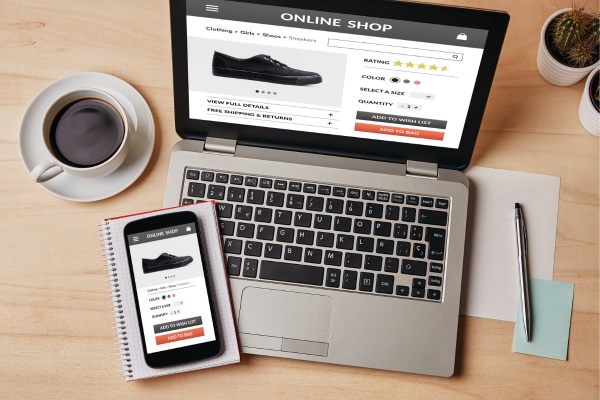



Comments
No comments yet. Be the first to comment!